LLMDyno
Benchmark local and cloud LLMs as coding agents, on your own hardware.
LLMDyno runs real multi-file coding tasks through open-source agent harnesses in offline Docker sandboxes, grades them with hidden tests and blind LLM judges, and compares correctness, code quality, speed, VRAM and cost. Drive it from a web dashboard, from Python, from TypeScript or from the command line.
pip install llmdynonpx llmdyno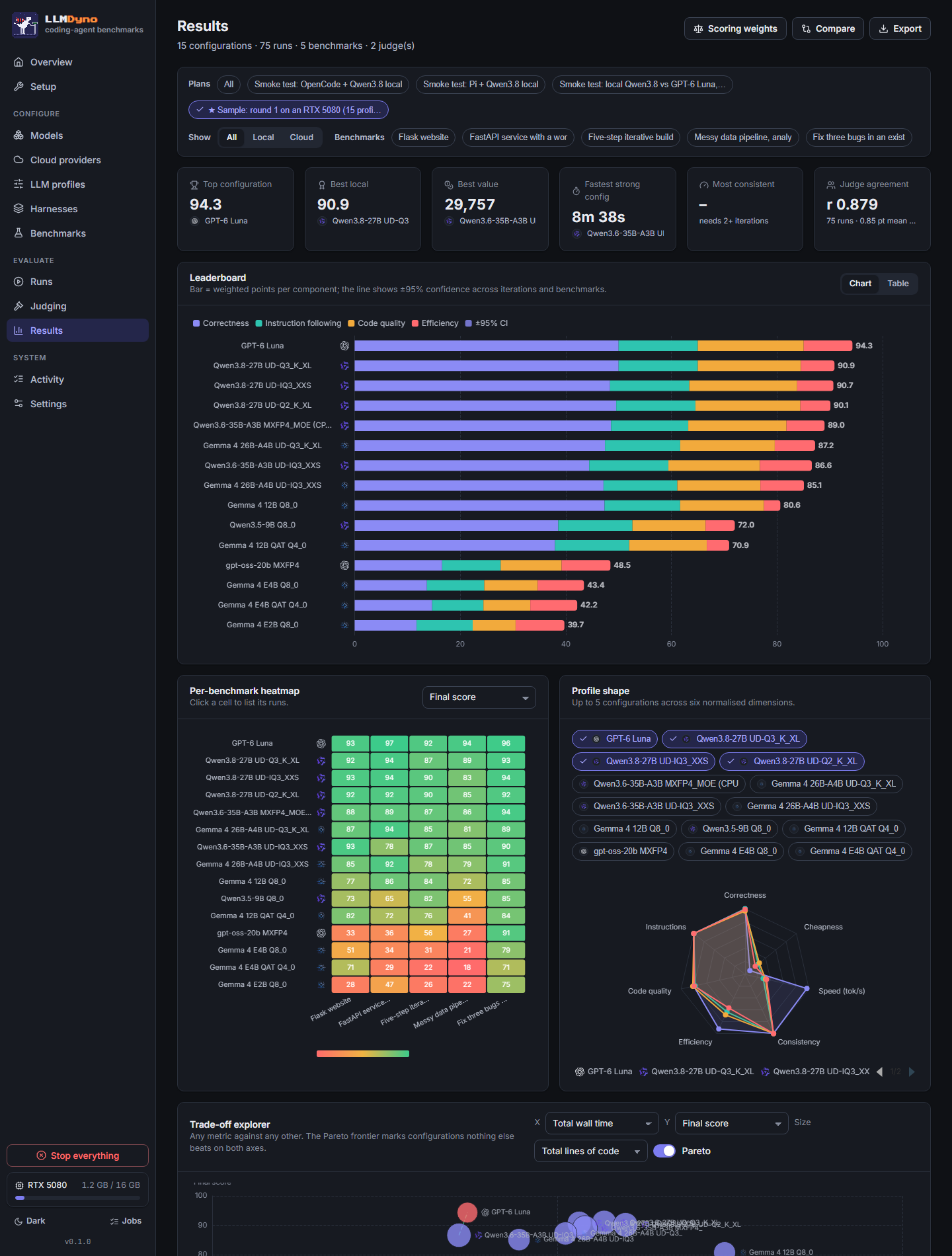
- agent harnesses, each in an offline sandbox
- 7agent harnesses, each in an offline sandbox
- worst VRAM estimate error across 84 configurations
- 66 MiBworst VRAM estimate error across 84 configurations
- API operations, each callable from Python, the CLI and TypeScript
- 116API operations, each callable from Python, the CLI and TypeScript
- cloud providers, plus any OpenAI-compatible endpoint
- 15+cloud providers, plus any OpenAI-compatible endpoint
The question it answers
Public leaderboards tell you which model does best on a datacenter GPU at full precision. If you run models yourself, the useful questions are narrower:
- Does a 27B model at 3 bits with a 48k context fit in 16 GB of VRAM, or not?
- Which quant, which KV cache type, and should the experts of a mixture-of-experts model sit on the CPU?
- Does it still work when it has to call tools, edit several files and run the tests?
- How does it compare, per task, in minutes and in money, with the API you would otherwise pay for?
LLMDyno answers those on your hardware, with your settings, and keeps every transcript so you can see why a model failed.
How a run works
- Pick the models: GGUF files served by llama.cpp on your GPU, or a cloud API such as OpenAI, Anthropic, Gemini, DeepSeek, Kimi or Qwen.
- Pick a harness: Pi, OpenCode, Codex CLI, Qwen Code, Crush, Aider or mini-SWE-agent, or describe your own in a JSON manifest.
- The agent works on a multi-file task inside a Docker sandbox with no internet. Its only way out is a proxy that holds the real API key, enforces spend caps and records every request.
- When the agent stops, hidden tests and code-quality probes run in a separate sandbox the agent never saw.
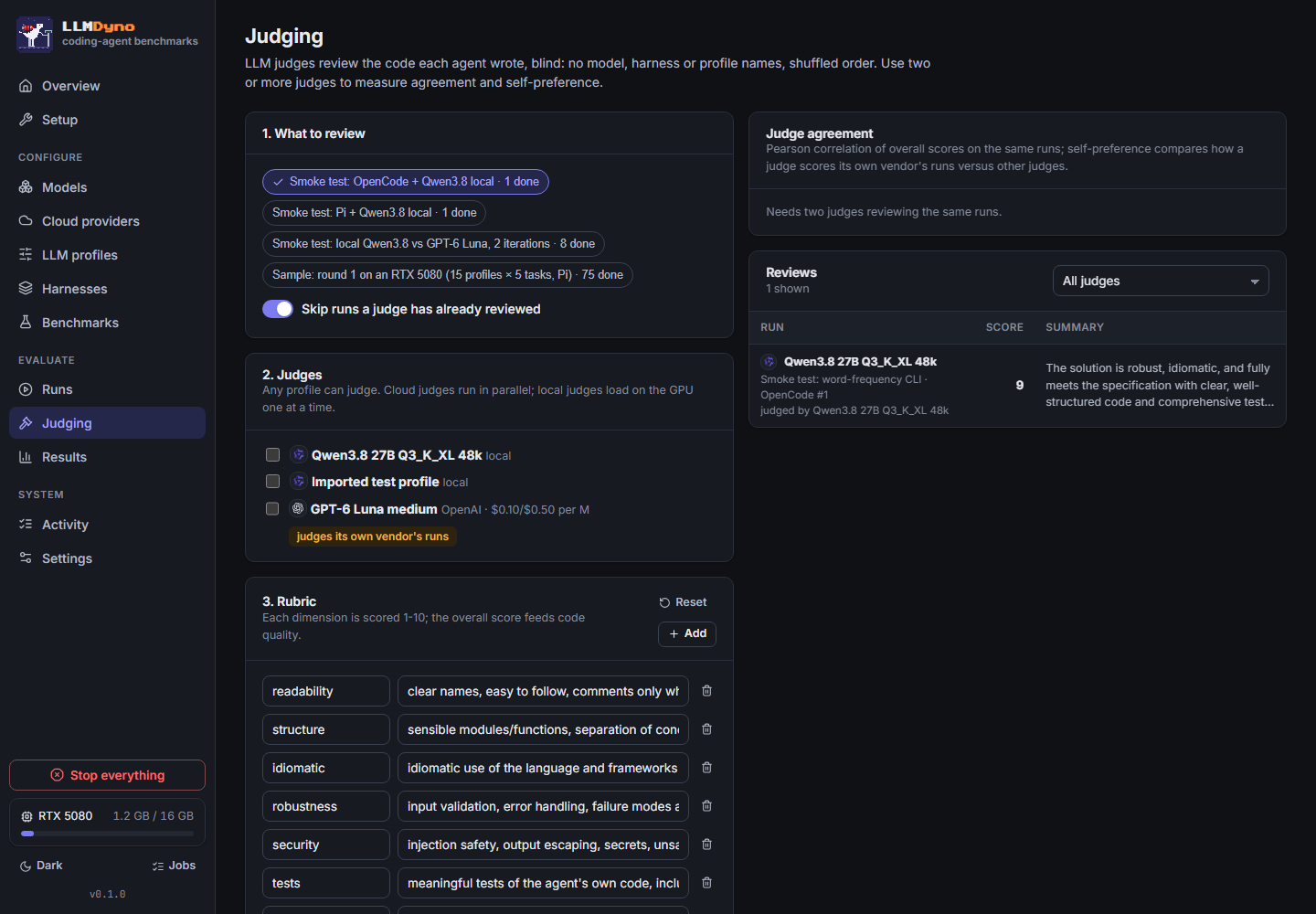
- LLM judges review the code blind and in shuffled order. LLMDyno reports how closely the judges agree and whether any judge favours its own vendor’s models.
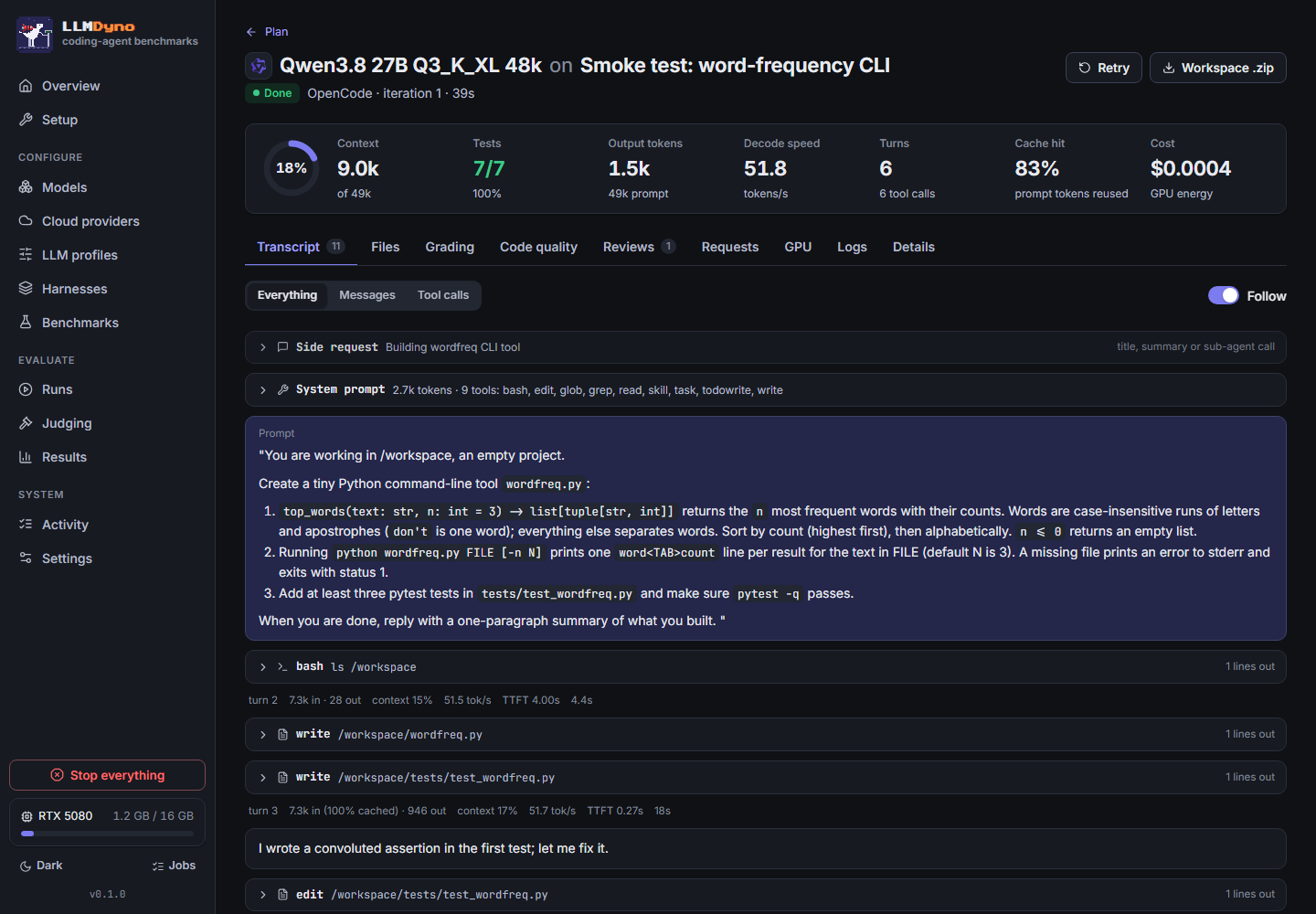
Because the proxy records every request, a transcript looks the same whichever harness produced it: thinking, tool calls, results, tokens and decode speed per turn.
Fit before you download
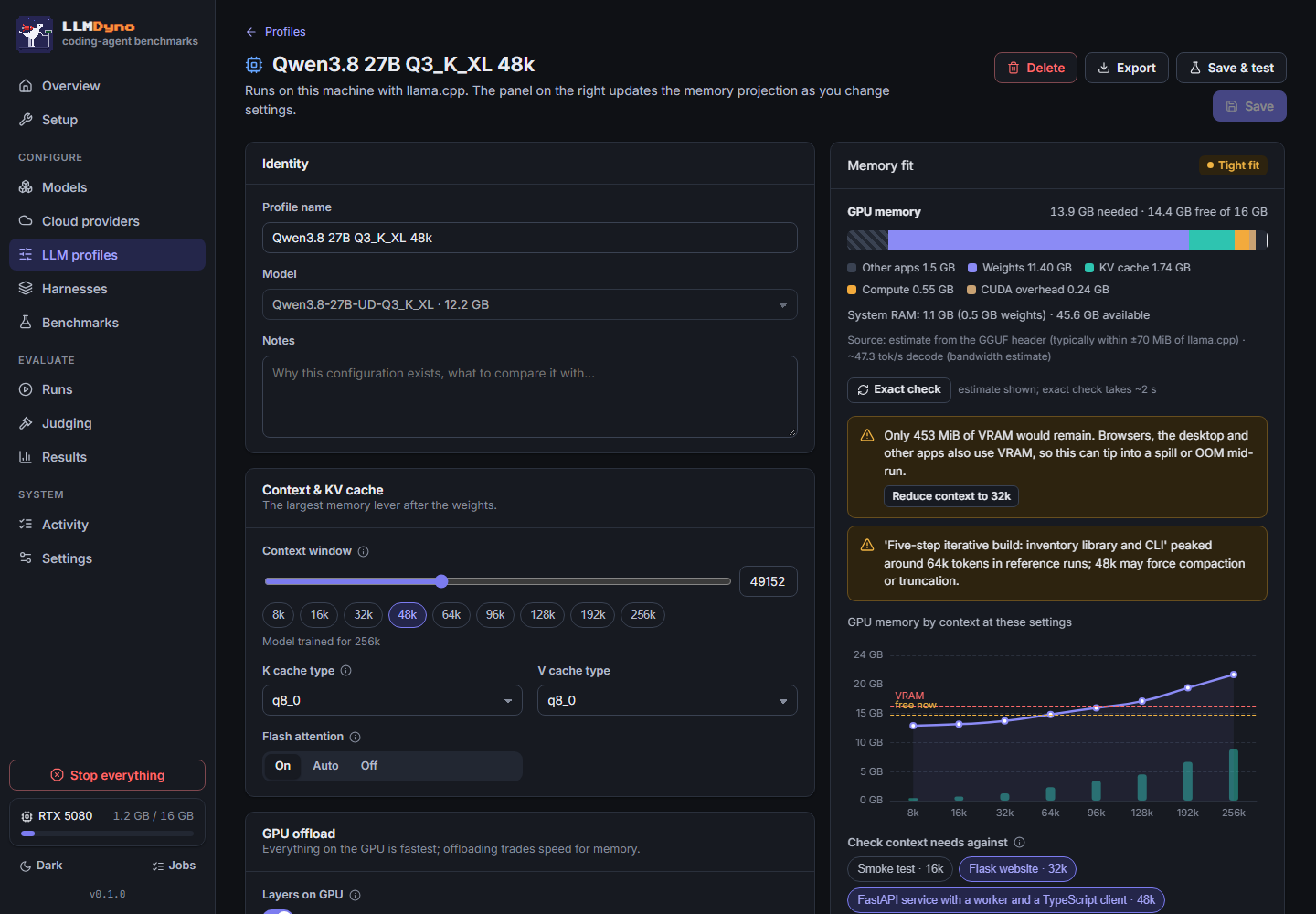
LLMDyno estimates VRAM from the GGUF header alone: weights per layer, KV cache (sliding-window, shared-KV, hybrid recurrent and MLA layers included), compute buffers and CUDA overhead. Checked against llama-fit-params on 84 configurations, the mean error is -4 MiB and the worst case is 66 MiB.
It also watches for a failure that is easy to miss on Windows. When VRAM runs out, the NVIDIA driver moves memory into system RAM instead of failing, and the model keeps running 5 to 20 times slower. Benchmark numbers quietly become wrong. LLMDyno reads the shared-memory counters during each run and flags the results that were affected.
Round 1: 15 configurations on an RTX 5080
The sample results that ship with LLMDyno: five agentic tasks, the Pi harness, one iteration each, judged blind by two models. Scores are out of 100 and weight hidden-test correctness at 50%, code quality at 25%, instruction following at 15% and efficiency at 10%.
| Configuration | Score | Correct | Decode tok/s | Wall time | Peak VRAM |
|---|---|---|---|---|---|
| GPT-6 Luna (API) | 94.3 | 100% | 181 | 9 min | cloud |
| Qwen3.8 27B UD-Q3_K_XL | 90.9 | 100% | 53 | 23 min | 14.9 GB |
| Qwen3.6 35B-A3B MXFP4, experts on CPU | 89.0 | 97% | 75 | 20 min | 14.7 GB |
| Gemma 4 26B-A4B UD-Q3_K_XL | 87.2 | 95% | 143 | 18 min | 14.8 GB |
| gpt-oss-20b MXFP4 | 48.5 | 33% | 178 | 10 min | 14.5 GB |
| Gemma 4 E2B Q8_0 | 39.7 | 23% | 187 | 9 min | 5.1 GB |
What the study showed:
- A 16 GB card came within 3.4 points of a frontier API. Qwen3.8 27B at 3 bits passed every hidden test on all five tasks. It took 23 minutes to the API’s 9, for about a cent of electricity.
- Speed and quality are separate axes. The two fastest local models, gpt-oss-20b and Gemma 4 E2B at 178 to 187 tokens per second, failed most of the tasks.
- For the mixture-of-experts model, a bigger quant with experts in system RAM beat a smaller one held entirely on the GPU: 97% correct against 89%.
- The judges agreed. Claude and GPT-6 Luna scored the same 75 runs with a correlation of 0.879. Luna showed no self-preference: on its own model’s runs it was, if anything, half a point harsher than Claude.
With five tasks and one iteration each, single-digit gaps are noise. Run more iterations and LLMDyno reports confidence intervals.
Public benchmarks as well
Its own tasks tell you how a setup handles work like yours. Public benchmarks tell you how your numbers line up with everyone else’s, so LLMDyno imports both as ordinary benchmarks:
- SWE-bench Verified, Lite or the 50-task Verified mini. The agent works inside each task’s official image and the patch is graded by the official harness, so “resolved” means what it means on the public leaderboard.
- Aider polyglot: 225 Exercism exercises in C++, Go, Java, JavaScript, Python and Rust, with every test enabled.
- Artificial Analysis reference figures (intelligence index, output speed, time to first token, blended price) shown next to what LLMDyno measured on your machine.
You can also write your own tasks, in the app’s editor or as a folder: a prompt, starter files, hidden tests and an optional reference solution. A validator checks that the starter fails the tests and the reference passes them, so a broken task never makes it into a benchmark.
The same engine from Python
Everything the dashboard does is also a library call and a command. Tests keep them in step.
import llmdyno

# A cloud model with a $2 cap (key from OPENAI_API_KEY)
gpt = llmdyno.cloud_model("openai", "gpt-6-luna",
                          reasoning_effort="low", budget_usd=2)

# A local GGUF, downloaded once
qwen = llmdyno.local_model("unsloth/Qwen3.8-27B-GGUF",
                           quant="UD-Q3_K_XL", ctx=49152)

results = llmdyno.bench([gpt, qwen],
                        benchmarks="suite_quick", harnesses="pi")
print(results)  # the leaderboard; .to_pandas(), .open() for the dashboard
There is an async API (llmdyno.aio), live events through llmdyno.watch(), and charts like the dashboard’s in matplotlib or plotly through results.plot. For CI, llmdyno ci --baseline ... --max-drop 2 fails a build when a model’s score drops, and the repository ships an example GitHub Actions workflow.
It plugs into pandas and polars, MLflow, Weights & Biases, Langfuse and OpenTelemetry, LiteLLM and Ollama, the Hugging Face Hub, Inspect AI, and pytest for regression checks in CI. Your own LangGraph, OpenAI Agents SDK, smolagents or PydanticAI agent can be benchmarked in the same sandbox as the built-in harnesses. In remote mode, the server runs on the GPU machine and llmdyno.connect() drives it from a laptop.
From JavaScript and TypeScript
The llmdyno npm package does two things. npx llmdyno starts the server, using an installed copy or fetching the matching version through uv or pipx. And npm install llmdyno gives you a typed client for Node 22 and later, with no dependencies, that makes the same calls as the Python library.
import { connect } from "llmdyno";

const dyno = await connect(); // http://127.0.0.1:8777

const gpt = await dyno.cloudModel("openai", "gpt-6-luna",
  { reasoning_effort: "low", budgetUsd: 2 });

const results = await dyno.bench([gpt, "Qwen3.8 27B Q3_K_XL 32k"],
  { benchmarks: "suite_quick", harnesses: "pi" });

console.table(results.leaderboard());
Plans can be followed live with for await (const ev of plan.watch()), and every one of the web API’s 116 operations is typed under dyno.api. A test generates that list from the server’s routes, so the client cannot drift from the server.
Agents written in TypeScript can be benchmarked too. An agent built with the Vercel AI SDK, Mastra, LangGraph.js or the OpenAI Agents SDK runs on Node 24 inside the same offline sandbox as the built-in harnesses and is graded the same way. The repository has a template for each framework.
The benchmarks themselves still run on Python 3.11+ and Docker on the machine that does the work.
Guard rails
- API keys are encrypted at rest and never enter a sandbox. Agents get a placeholder key and no internet.
- Each provider and each plan has a hard budget. The proxy refuses requests past it and counts spend even on streams cut off halfway.
- One red button, or Ctrl+Shift+X, cancels every run and job, removes every sandbox and proxy container and stops llama-server.
- The pixel dinosaur on the treadmill reports status: it sprints while a benchmark runs, waits on a podium while judges deliberate and turns red on a panic stop. The browser tab icon follows it, so you can check progress from another tab.

Platforms
Windows 10 and 11, Linux, and macOS 13 or later, on x86-64 and ARM64 including Apple Silicon. LLMDyno installs a matching prebuilt llama.cpp (CUDA 12 or 13, Metal, Vulkan, ROCm, SYCL, OpenCL for Adreno, or CPU). On a Mac it plans memory against the GPU’s share of unified memory rather than total RAM, and explains how to raise that limit.
How it is tested
Every push to main runs CI on Python 3.11, 3.12 and 3.13 on Ubuntu and Windows, plus macOS on Apple Silicon, Ubuntu on ARM64 and, as an experiment, Windows on ARM64. The same run type-checks the library with pyright, executes the example notebooks, builds the documentation and the web interface, and tests the JavaScript client on Node 22 and 24 against a live server. The suite has 176 Python tests across 26 files and 19 tests for the JavaScript client.
Questions
- What is LLMDyno?
- An open-source app that benchmarks LLMs as coding agents. It runs agent harnesses such as OpenCode, Codex CLI and Aider on coding tasks with hidden tests, using local models through llama.cpp or cloud APIs, and compares correctness, code quality, speed, VRAM and cost.
- How is it different from SWE-bench or the Aider leaderboard?
- Those publish fixed results for fixed setups. LLMDyno is a tool you run yourself, so you can test the exact quant, context size, KV cache and harness you would use, on your own GPU. It can also run SWE-bench and the Aider polyglot benchmark, graded the official way.
- Will my model fit in VRAM?
- LLMDyno estimates it from the GGUF header before you download, then checks it exactly with llama-fit-params. Across 84 configurations the worst estimate was 66 MiB off. It warns about out-of-memory, spilling into shared memory, CPU offload and context limits.
- Can a runaway agent run up an API bill?
- No. Each provider and each plan has a hard budget enforced by a proxy between the agent and the API, which counts spend even for requests cut off mid-stream. A panic stop halts every run.
- Does it work on a Mac or on ARM?
- Yes. It runs on Windows, Linux and macOS, on x86-64 and ARM64 including Apple Silicon, where it plans memory around the GPU's share of unified memory.
- Can I use it from JavaScript or TypeScript?
- Yes. The llmdyno npm package has a typed client for Node 22 and later with the same calls as the Python library, and npx llmdyno starts the server. The benchmarks themselves still need Python 3.11+ and Docker on the machine that runs them.
Further reading
- Python library and CLI
- JavaScript and TypeScript
- Integrations: pandas, MLflow, Langfuse, OpenTelemetry, LiteLLM, Inspect AI and more
- Remote mode
- Writing benchmarks
- Adding harnesses
- Architecture
- API reference